




Business Email in Malaysia: Workspace vs Microsoft 365
Google Workspace vs Microsoft 365 vs hosting email for Malaysian SMEs: 2026 prices per user, storage, migration, and SPF, DKIM and DMARC set-up.
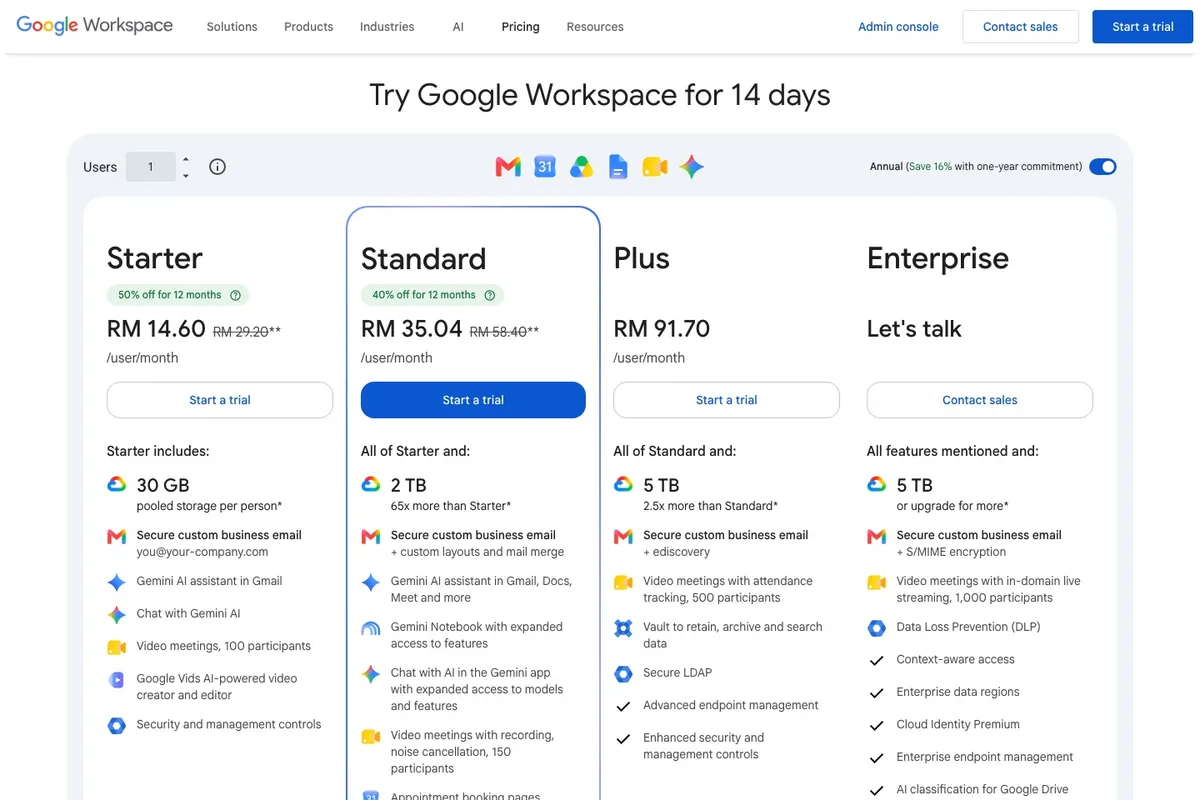
Business email in Malaysia usually means Google Workspace, Microsoft 365, or the mailboxes that come with your web hosting. Google Workspace Business Starter costs RM29.20 per user a month and Microsoft 365 Business Basic costs USD3.50 per user a month, both on an annual plan and before tax. Hosting mailboxes live inside your hosting account and share its disk space, so they suit a few low-volume addresses better than a whole team.
How much does business email cost in Malaysia?
These are the official Malaysian prices in October 2026, per user per month.
| Plan | Annual plan | Month to month | Storage per user |
|---|---|---|---|
| Google Workspace Business Starter | RM29.20 | RM35 | 30 GB, pooled |
| Google Workspace Business Standard | RM58.40 | RM70 | 2 TB, pooled |
| Google Workspace Business Plus | RM91.70 | RM110 | 5 TB, pooled |
| Microsoft 365 Business Basic | USD3.50 | USD4.20 | 100 GB mailbox, 1 TB OneDrive |
| Microsoft 365 Business Standard | USD11.20 | USD13.44 | 100 GB mailbox, 1 TB OneDrive |
| cPanel hosting mailboxes | Part of your hosting plan | Part of your hosting plan | Shares the hosting account’s disk space |
What the table does not show:
- Tax is extra. Both pages say their prices do not include tax. Foreign providers charge service tax on digital services at 8%, according to Grant Thornton Malaysia.
- Microsoft prices its Malaysian business plans in US dollars, so the ringgit cost moves with the exchange rate.
- Annual plans cost less. Google says the one-year commitment saves 16%, and Microsoft says up to 16%. These plans cover up to 300 users.
- Introductory offers change. When we checked, Google offered new customers 50% off Starter and 40% off Standard for 12 months, on the first 20 users.
Google Workspace vs Microsoft 365: which suits your SME?
Both give each user an address at your own domain, such as you@yourcompany.com.my, plus calendars, video meetings and cloud storage. The real differences are the apps your team already uses and how storage works.
| Google Workspace | Microsoft 365 | |
|---|---|---|
| Email app | Gmail | Outlook |
| Office apps | Docs, Sheets and Slides | Web and mobile Word, Excel and PowerPoint on Basic, desktop apps from Standard |
| Meetings | Google Meet, 100 participants on Starter, 150 on Standard | Microsoft Teams, on plans sold with Teams |
| Storage | One pool shared across the organisation | Separate mailbox and OneDrive for each user |
| Moving old email in | Data import tool for IMAP mailboxes | IMAP migration in Exchange Online |
Workspace suits teams that already work in Gmail and Google Docs. Because storage is pooled, a heavy user can draw on space a light user does not need. Microsoft 365 suits teams that live in Outlook and Excel. If staff need the desktop Office apps, price Business Standard, because Business Basic only includes the web and mobile versions.
Is email from your web hosting good enough?
If your website runs on cPanel hosting, your host can let you create mailboxes for your domain inside the same account. Each mailbox has a quota, and all of them draw on the hosting account’s disk space. That works for a few addresses, such as info@ and sales@, that receive enquiries.
It gets harder as the team grows. A full mailbox eats space your website needs, and if the hosting account has a problem, website and email are affected together. cPanel’s Email Deliverability tool can check your SPF, DKIM and DMARC records, but only if your host has switched it on.
How do you stop business email going to spam?
Three DNS records prove to other mail servers that your email is genuine. You add them wherever your domain’s DNS is managed, usually at your domain registrar or hosting provider.
- SPF lists the servers allowed to send email for your domain. Google’s
record for Workspace is
v=spf1 include:_spf.google.com ~all. Microsoft 365 needsinclude:spf.protection.outlook.com. Only one SPF record is allowed per domain, so if your website or newsletter tool also sends email, add it to the same record. - DKIM adds a digital signature to every message. Your provider creates the key. Google gives you a TXT record in the Admin console, and Microsoft 365 uses CNAME records shown in the Defender portal.
- DMARC tells receiving servers what to do with email that fails those
checks, and sends you reports. It is a TXT record at
_dmarcon your domain. Start withp=noneto collect reports without blocking anything, then move toquarantineorrejectonce all your genuine email passes.
This is no longer optional. Since February 2024, Gmail has required everyone sending to Gmail accounts to set up SPF or DKIM. Senders of more than 5,000 messages a day need SPF, DKIM and DMARC. Google notes that SPF can take up to 48 hours to start working.
How do you move your email without losing it?
- Sign up with the new provider and verify that you own the domain.
- Create a user for each person who needs a mailbox.
- Copy your old email across. Google’s data import tool copies mail from IMAP accounts. Microsoft’s IMAP migration moves email folders only, not contacts or calendars, up to 500,000 items per mailbox and 35 MB per message.
- Point your MX records to the new provider. For Workspace the value is
smtp.google.com, and Google says the change can take up to 72 hours.
If the move is part of a bigger website change, our website migration SEO checklist covers the website side.
Which option should you choose?
| Your situation | Best fit |
|---|---|
| Team already works in Gmail and Google Docs | Google Workspace Business Starter or Standard |
| Staff need desktop Word, Excel and Outlook | Microsoft 365 Business Standard |
| Mainly email, lowest cost per user | Microsoft 365 Business Basic |
| Two or three enquiry addresses, low volume | Hosting mailboxes |
| Email must be retained and searchable for audits | Google Workspace Business Plus, which includes Vault |
Your email depends on your domain, so choose it with care. See .com.my vs .my vs .com.
O2O registers domains and provides web hosting, with domain, hosting and website managed by the same team. If your domain or website is with us, contact us before you change any DNS records, so the switch does not break your site.
Frequently asked questions
Is Google Workspace or Microsoft 365 cheaper in Malaysia?
Microsoft 365 Business Basic, at USD3.50 per user a month on an annual plan, is the cheaper entry plan against RM29.20 for Google Workspace Business Starter. Basic has no desktop Office apps, so compare the plans your team would actually use.
Do the prices include SST?
No. Both official Malaysian price pages show prices before tax, and foreign providers charge service tax on digital services at 8%.
Can I use my .com.my domain with Google Workspace or Microsoft 365?
Yes. Both include email at your own domain. You keep the domain with your registrar and point its MX, SPF, DKIM and DMARC records to the provider.
Will I lose my old emails if I switch?
Not if you import them before you close the old mailboxes. Google’s data import tool and Microsoft’s IMAP migration both copy existing email, though Microsoft’s IMAP route does not move contacts or calendars.
Do I really need DMARC?
Gmail requires it if you send more than 5,000 messages a day to Gmail accounts. For smaller senders, it lets receiving servers reject email that pretends to come from your domain once you set an enforcement policy.
Sources: Google Workspace pricing, Malaysia, Microsoft 365 business plans, Malaysia, Gmail email sender guidelines, Google: set up SPF, Google: set up DKIM, Google: set up DMARC, Google: MX records, Google: data import tool, Microsoft: SPF, Microsoft: DKIM, Microsoft: IMAP migration, cPanel: Email Accounts, cPanel: Email Deliverability, Grant Thornton Malaysia: SST overview, checked October 2026.