




MyInvois Portal Guide: Log In and Issue an E-Invoice
How to log in to the MyInvois Portal through MyTax, give your accountant access, issue your first e-invoice, and cancel or correct one within LHDN's rules.
The MyInvois Portal is LHDN’s free web tool for issuing e-invoices without accounting software. There is no separate sign-up: you reach it through your MyTax login. It suits businesses that issue a handful of e-invoices a month. If you issue them every day, connect an app instead. This guide covers how to log in, issue your first e-invoice, and cancel or correct one.
Where to log in
There are two environments, and each one has its own address:
| Environment | Address | Use it for |
|---|---|---|
| Production | mytax.hasil.gov.my | Real e-invoices |
| Sandbox | preprod-mytax.hasil.gov.my | Testing only. Nothing here counts |
- Log in to MyTax with the account that represents the business, normally a director’s account.
- When MyTax asks for a role, choose the company you are acting for, not your personal tax file.
- Click MyInvois in the menu.
On your first visit, you accept the terms and complete the taxpayer and user profiles. Our guide to the MyInvois Client ID and Client Secret covers that first login in detail.
Give your accountant or staff access
Do not share the director’s MyTax password. Open View Taxpayer Profile from the profile menu and scroll to Representatives. There you can add an intermediary, such as your accounting firm, and register ERP systems or apps that submit e-invoices for you. Each person then logs in with their own MyTax account.
Issue your first e-invoice
- Create a new document and choose its type. The types are invoice, credit note, debit note and refund note. Each has a self-billed version for purchases from suppliers who cannot issue e-invoices, such as foreign suppliers.
- Enter the buyer’s details. These are name, tax identification number (TIN), registration or ID number, SST number if the buyer is registered, address and contact details. If an individual buyer does not give a TIN, LHDN’s guideline provides a general TIN, EI00000000010, for the general public.
- Add the line items. Each line needs a classification code, a description, the quantity, the unit price, and the tax type and rate. Discounts go on the line or on the whole invoice.
- Review and submit. LHDN validates the document within seconds. A valid e-invoice gets a unique identifier (UUID) and a QR code that links to the validation record.
- Send it to the buyer. Download the validated e-invoice, or share its validation link.
If validation fails, the portal shows the field at fault. The most common causes are a wrong buyer TIN and a missing classification code. See common LHDN e-invoice errors for fixes.
Many e-invoices at once: batch upload
The portal also accepts batch uploads using LHDN’s Excel template. This is useful for the monthly consolidated e-invoice, or for catching up on a backlog. It is still a manual process. If you prepare a spreadsheet every week, an integration will save more time than it costs.
Consolidated e-invoices for retail sales
Customers who do not ask for an e-invoice do not need one each. You report those sales in a single consolidated e-invoice for the month, submitted within 7 calendar days after the month ends. The rules on which transactions can be consolidated are in our guide to consolidated e-invoices.
Cancel or correct an e-invoice
- Within 72 hours of validation, you can cancel an e-invoice in the portal. You must give a reason. The buyer can also request a rejection in the same window, and you then cancel and reissue it.
- After 72 hours, you cannot cancel. Issue a credit note, debit note or refund note that references the original e-invoice instead.
Our guide to credit, debit and refund notes explains which one to use.
Portal or app?
| MyInvois Portal | Store app or plugin | Accounting or ERP software | |
|---|---|---|---|
| Cost | Free | Subscription or one-off | Depends on your software |
| Effort per e-invoice | Typed in by hand | Automatic from the order | Automatic from your invoice |
| Customer requests | You handle each one | Request form on your store | Depends on your software |
| Best for | A few e-invoices a month | Online stores | Businesses that already invoice from software |
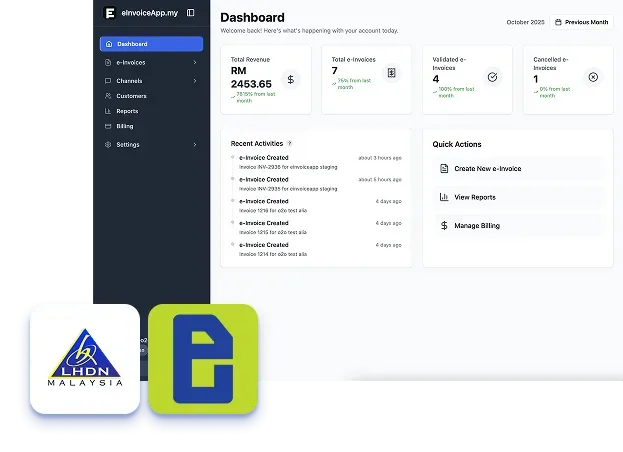
We build e-invoice apps for Shopify, WooCommerce, OpenCart and Shopline that submit to MyInvois directly from your orders. Instead of typing each e-invoice into the portal, you see every submission, validation and cancellation in one dashboard:
Frequently asked questions
Is the MyInvois Portal free?
Yes. LHDN provides it at no cost to every taxpayer.
Do I need to register separately for MyInvois?
No. You reach it through your existing MyTax login. On your first visit, you accept the terms and complete your taxpayer and user profiles.
Can my accountant issue e-invoices for my business?
Yes. Add them as an intermediary under Representatives in your taxpayer profile, so they log in with their own MyTax account.
How long do I have to cancel an e-invoice?
72 hours from validation. After that, issue a credit note, debit note or refund note instead.
Do I have to use the portal?
No. The portal is one of three ways to submit. You can also use an app or plugin for your store, or accounting or ERP software that connects to MyInvois.
Not sure whether you need to e-invoice yet? Check the phases and the RM3 million exemption in our e-invoice guide for 2027.
Source: LHDN, e-Invoice FAQ and the MyInvois Portal user guide.