




How to Check a TIN Number in Malaysia (for E-Invoicing)
How to check a TIN number in Malaysia: IG and C formats, the MyTax TIN search, validating a buyer's TIN for e-invoices, and LHDN's general TINs.
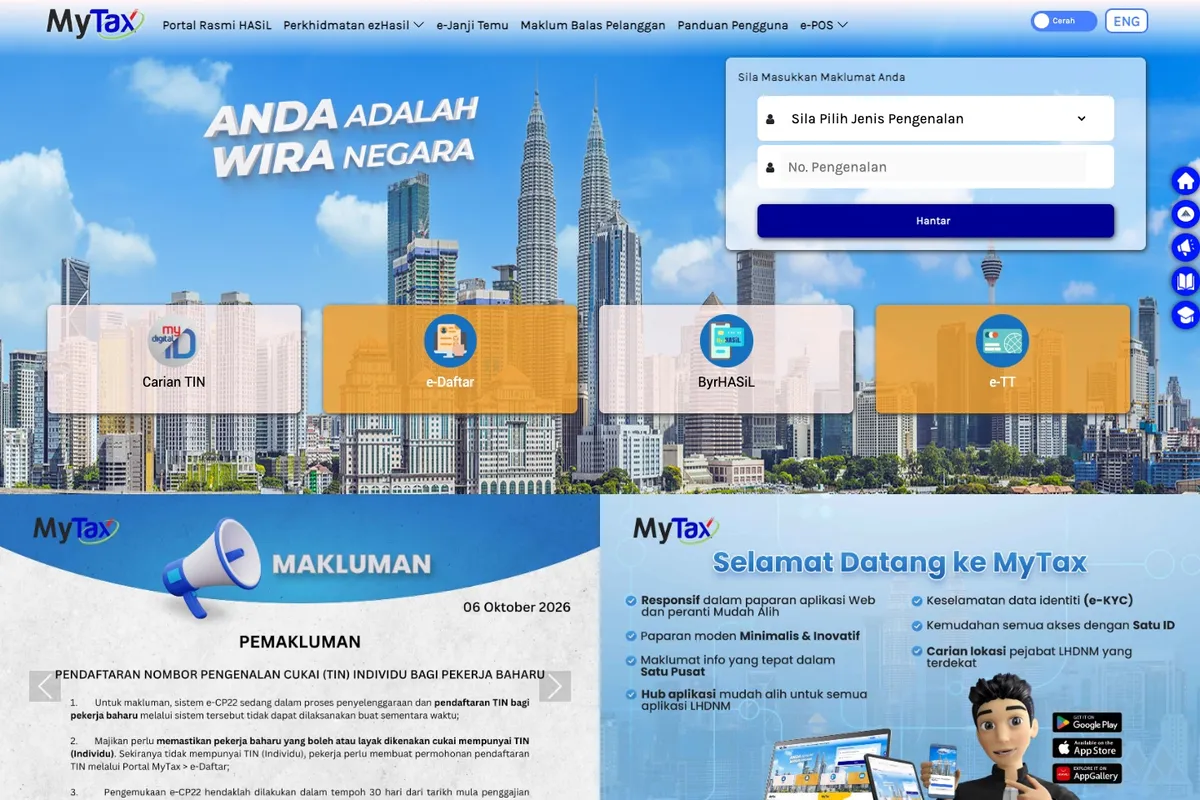
To check a TIN number in Malaysia, open the Carian TIN (TIN search) menu on the MyTax Portal at mytax.hasil.gov.my. Individuals search with their MyKad or passport number, and businesses with their business registration number (BRN). To confirm a customer’s TIN before you issue an e-invoice, use the same search in the MyInvois Portal, or LHDN’s TIN validation API if your system submits e-invoices automatically.
What is a TIN number in Malaysia?
A Tax Identification Number (TIN), or Nombor Pengenalan Cukai, is the number LHDN assigns to every registered taxpayer, individuals and businesses alike. Malaysian citizens and permanent residents aged 18 and above are registered automatically, using data from the National Registration Department (JPN).
Your TIN is not your MyKad number. It starts with a letter code, such as IG for individuals or C for companies.
Why does an e-invoice need the buyer’s TIN?
The buyer’s TIN is a required field on an e-invoice. When you submit one, MyInvois checks that the taxpayers named in it are valid, so a TIN that does not match LHDN’s records fails validation.
For the buyer, the validated e-invoice is their proof of expense for tax purposes. The TIN is what ties that record to them.
What does a Malaysian TIN look like?
| Taxpayer | Prefix | Example |
|---|---|---|
| Individual | IG | IG115002000 |
| Company (Sdn Bhd or Bhd) | C | C20880050010 |
| Partnership | D | D4800990020 |
| Association | F | F10234567090 |
| Cooperative society | CS | |
| Limited liability partnership | PT |
Other prefixes cover trust bodies (TA), unit and property trusts (TC), business trusts (TN), real estate investment trusts and property trust funds (TR), deceased persons’ estates (TP), Hindu joint families (J), non-resident public entertainers (FA) and Labuan entities (LE).
Three format rules from LHDN’s MyInvois documentation:
- Individual TINs start with IG. Older numbers that start with SG or OG now use IG with the same digits, so SG123456789 becomes IG123456789. An individual TIN is at most 14 characters, including the prefix.
- Non-individual TINs always end in 0. If yours does not, add one: C123456789 becomes C1234567890.
- Remove any zeros straight after the prefix. C01234567890 becomes C1234567890.
A sole proprietor uses the owner’s individual TIN (starting IG) together with the business’s BRN. For that pair to validate, the owner needs the Business Owner role in their MyTax profile.
How do I find my own TIN?
Individuals can check in any of these places:
- your profile after logging in to MyTax
- the Carian TIN menu on MyTax, using your MyKad or passport number
- the front page of your income tax return
- the HASiL Contact Centre on 03-8911 1000, HASiL Live Chat, or a HASiL branch
Companies incorporated online through SSM’s MyCoID portal are registered for a TIN automatically. Search Carian TIN with the company’s 12-digit BRN, or check the company’s profile in MyTax.
If you have no TIN, apply online. Since 1 January 2024, TIN applications for individuals and companies go through e-Daftar on the MyTax Portal: choose e-Daftar, select your taxpayer type, and fill in the form with the supporting documents it asks for.
How do I check a customer’s TIN?
There are three official ways, depending on how you issue e-invoices:
- MyTax Carian TIN. Search by MyKad or passport number for individuals, or by BRN for businesses. A business without a BRN can be found by its registered name. The search shows one matching TIN.
- MyInvois Portal. The same TIN search is built into the portal, for businesses that key in e-invoices by hand. Our MyInvois Portal guide shows where the buyer’s details go.
- MyInvois API. Store apps and ERP systems use two endpoints. Validate Taxpayer’s TIN confirms that a TIN matches an ID number (NRIC, passport, BRN or army number) and returns “not found” if the pair does not match. Search Taxpayer’s TIN finds a TIN from a name or ID number and returns only one result.
LHDN asks systems to validate a buyer’s TIN once, when the customer is set up, and store the result. Calling the API before every submission can get your system throttled.
Use these searches only for tax purposes, which include e-invoicing. LHDN warns that misuse can lead to prosecution under Section 66A of the Income Tax Act 1967.
Our e-invoice apps for Shopify, WooCommerce, OpenCart and Shopline collect the buyer’s TIN and ID on a request form and submit them to MyInvois, which checks them against LHDN’s records.
What if the buyer has no TIN or is foreign?
LHDN lets individual buyers choose what they give you:
- Malaysians (MyKad or MyTentera) and MyPR or MyKAS holders can give their TIN, their ID number, or both.
- Other foreign individuals give their LHDN TIN, or their TIN and passport number. If they have no LHDN TIN, you use a general TIN with their passport number.
This table shows what goes in the e-invoice:
| The buyer gives you | TIN field | ID number field |
|---|---|---|
| Their TIN only | Their TIN | 000000000000 |
| Their MyKad, MyTentera, MyPR or MyKAS number only | EI00000000010 | Their ID number |
| Both | Their TIN | Their ID number |
| A passport only (foreign individual, no LHDN TIN) | EI00000000020 | Their passport number |
LHDN’s general TINs
| General TIN | Use it for |
|---|---|
| EI00000000010 | Malaysian individuals who give only a MyKad or MyTentera number, MyPR and MyKAS holders who give only that number, and the buyer on a consolidated e-invoice |
| EI00000000020 | Foreign individual buyers who give only a passport number, and export sales where the foreign buyer’s TIN is not available |
| EI00000000030 | Foreign suppliers without a TIN, on self-billed e-invoices |
| EI00000000040 | Government bodies, state and local authorities, statutory bodies, and exempt institutions without a TIN |
For a foreign business buyer, enter its TIN if it has one from LHDN, otherwise EI00000000020, and “NA” for details that do not apply. For government buyers, use EI00000000040 with “NA” as the registration number.
Customers who do not ask for an e-invoice do not give a TIN at all. They get a normal receipt, and their sales go into your monthly consolidated e-invoice under EI00000000010.
What are the most common TIN mistakes?
- Keeping an old SG or OG prefix. Change it to IG and keep the digits.
- Getting the zeros wrong on a company TIN. Remove zeros after the prefix, and make sure the TIN ends in 0.
- Pairing the TIN with the wrong ID. LHDN’s validation checks the TIN and ID number as a pair, so a correct TIN with the wrong MyKad or BRN still fails.
- Putting a MyKad number in the TIN field. Enter EI00000000010 as the TIN and the MyKad number as the ID.
- Using EI00000000010 for a foreign passport holder. The general TIN for foreign buyers is EI00000000020.
- Defaulting every foreign buyer to the general TIN. LHDN expects you to check whether they have a TIN first. The general TIN is only for those who do not.
- Using a general TIN for a Malaysian business buyer. None of LHDN’s general TINs covers a Malaysian company, so a business buyer must give its own TIN.
See common LHDN e-invoice errors for the error messages these mistakes produce and how to fix each one.
Frequently asked questions
Is my IC number the same as my TIN?
No. Your TIN is a separate number from LHDN, starting with IG. For e-invoices, though, a Malaysian can give their MyKad number instead. The seller then enters EI00000000010 as the TIN and the MyKad number as the ID.
What is the TIN for a company in Malaysia?
A company TIN starts with C and ends in 0, for example C20880050010. Companies incorporated online through SSM’s MyCoID get one automatically. Find it in Carian TIN with the company’s BRN.
Can I look up someone else’s TIN?
Yes, for tax purposes, including e-invoicing. Search their MyKad, passport number or BRN in Carian TIN on MyTax or in the MyInvois Portal. The search shows one matching TIN, and misuse can be prosecuted.
What if I do not have a TIN?
Malaysian citizens and permanent residents aged 18 and above are registered automatically, so check MyTax first. If you have none, apply online through e-Daftar on MyTax.
Do sole proprietors have a separate TIN?
A sole proprietor uses the owner’s individual TIN, starting IG, together with the business registration number. Assign the Business Owner role in MyTax so the pair validates.
Does a customer need a TIN to buy from my store?
No. Only customers who ask for an e-invoice give their details. Everyone else gets a normal receipt, and their sales go into your consolidated e-invoice.
Sources: LHDN, e-Invoice Guideline (Version 4.8), e-Invoice Specific Guideline (Version 4.9), e-Invoice FAQ, Information on Tax Identification Numbers, media statement on the TIN search function (1 January 2025), and the individual and company registration pages, plus the MyInvois SDK FAQ, Validate Taxpayer’s TIN and Search Taxpayer’s TIN pages, checked October 2026.