




E-Invoice Malaysia: The Complete LHDN MyInvois Guide
E-invoice Malaysia explained: who must comply, LHDN phases, the RM3 million exemption, MyInvois submission, buyer TINs, consolidation, penalties, checklist.
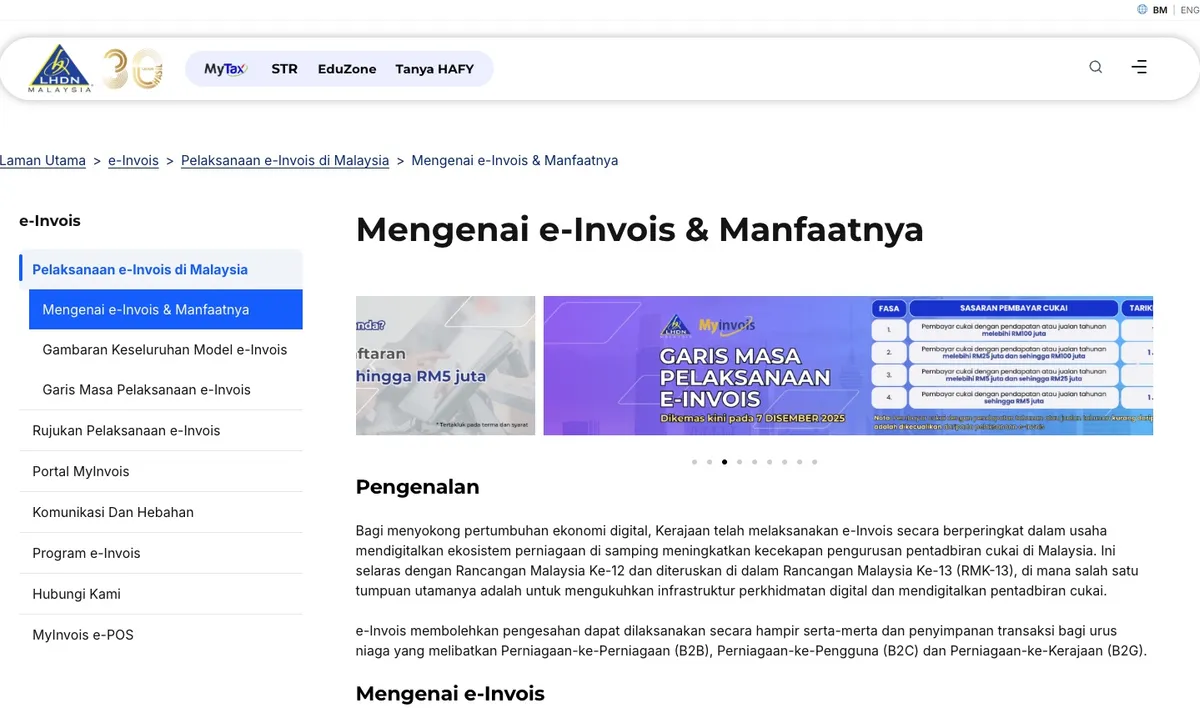
E-invoicing in Malaysia means sending every invoice to LHDN (the Inland Revenue Board, also called HASiL or IRBM) for validation before it counts as a valid tax document. Businesses with annual turnover or revenue of RM3 million or more must issue e-invoices through LHDN’s MyInvois system. Businesses below RM3 million are exempt. Phase 4 businesses, with turnover from RM3 million to RM5 million, are in a relaxation period until 31 December 2027, and full enforcement starts on 1 January 2028.
This guide gives you the whole picture in one place. Each section links to a detailed guide when you need the specifics.
What is e-invoicing in Malaysia?
An e-invoice is a digital record of a sale that LHDN checks and validates in near real time. It replaces paper and PDF invoices, receipts and bills as proof of income for the seller and proof of expense for the buyer.
The flow is the same for every business:
- You create the e-invoice in the MyInvois Portal, or in your store, accounting or ERP software.
- You submit it to MyInvois. LHDN checks the format and the details, such as whether the TINs are valid.
- LHDN validates it and assigns a unique identifier (UUID). A validated e-invoice carries a QR code that links to the validation record.
- You share it with the buyer, as a download or a validation link.
- The buyer has 72 hours to request a rejection, and you have 72 hours to cancel it. After that, you change it only by issuing a note.
E-invoicing covers more than sales invoices. LHDN recognises four document types: invoice, credit note, debit note and refund note. Each has a self-billed version, which the buyer issues instead of the seller in cases such as purchases from foreign suppliers or from individuals who are not in business.
Who must e-invoice, and when?
LHDN rolled out e-invoicing in four phases, based on annual turnover or revenue. Each phase had a relaxation period after its start date, when LHDN allowed more flexibility while businesses settled in.
| Phase | Annual turnover or revenue | Mandatory from | Relaxation period ends |
|---|---|---|---|
| 1 | Above RM100 million | 1 August 2024 | 31 January 2025 |
| 2 | RM25 million to RM100 million | 1 January 2025 | 30 June 2025 |
| 3 | RM5 million to RM25 million | 1 July 2025 | 31 December 2025 |
| 4 | RM3 million to RM5 million | 1 January 2026 | 31 December 2027 |
| Exempt | Below RM3 million | Not required | Not applicable |
LHDN raised the exemption threshold from RM1 million to RM3 million, effective 1 September 2026, in version 4.8 of its e-Invoice Guideline. Three conditions decide whether the exemption applies to you:
- Group revenue counts. The exemption does not apply if your business has a non-individual shareholder, holding company, related company or joint venture partner with turnover of RM3 million or more.
- Once in, you stay in. If you are already required to e-invoice, a later drop in turnover does not take you out.
- New and growing businesses have their own start dates. The guideline sets them out, so check yours before you plan.
Exempt businesses can still choose to e-invoice. Some do because their B2B customers ask for it. Budget 2027 did not change the phases or the threshold.
Our guide to e-invoice phases, the exemption and deadlines for 2027 covers each condition and a quarter-by-quarter plan for Phase 4 businesses.
What goes on an e-invoice?
LHDN’s guideline lists 55 data fields in eight groups: address, business details, contact number, invoice details, parties, party details, payment info, and products or services. Some fields are optional, and some apply only in specific cases, such as foreign currency or tax exemptions.
The fields that matter most day to day:
| Group | Key fields |
|---|---|
| Supplier (you) | Name, TIN, business registration number (BRN), SST number, MSIC code, business activity |
| Buyer | Name, TIN, BRN or ID number, SST number, address, contact number |
| Invoice details | Document type, invoice number, date and time, currency, original e-invoice reference (notes) |
| Products | Classification code, description, quantity, unit price, tax type and rate, discount |
| Totals | Subtotal, total excluding tax, tax amount, total including tax, total payable |
Two fields cause more trouble than the rest:
- Buyer’s TIN. It must match LHDN’s records, paired with the right ID number. See the TIN section below.
- Classification code. Every line needs one of LHDN’s codes, which describe the type of sale. For example, 004 is the code for a consolidated e-invoice.
How do you submit an e-invoice to LHDN?
There are two routes into MyInvois, and three practical ways to use them:
| Method | Route | Best for | Trade-off |
|---|---|---|---|
| MyInvois Portal | Portal | A few e-invoices a month | Free, but every e-invoice is typed in by hand |
| Store app or plugin | API | Online stores | Issues e-invoices from orders automatically |
| Accounting or ERP software | API | Businesses that already invoice from it | Depends on whether your software supports MyInvois |
The MyInvois Portal is LHDN’s free web tool. You reach it through your MyTax login, with no separate sign-up. It also accepts batch uploads from an Excel template, which helps with the monthly consolidated e-invoice. Our MyInvois Portal guide covers logging in, giving your accountant access, and issuing your first e-invoice.
The MyInvois API is how software submits for you. Each app authenticates with an ERP Client ID and Client Secret that you generate in the portal by registering an ERP system. Two rules prevent most outages: Staging and Live need separate credentials, and submissions stop the moment a Client Secret expires. Our MyInvois Client ID and Client Secret guide walks through each step.
MyInvois limits each API submission to 100 e-invoices and 5MB, and each e-invoice to 300KB. Test in the sandbox (preprod-mytax.hasil.gov.my) before you go live on mytax.hasil.gov.my. Nothing in the sandbox counts.
What TIN do you use for the buyer?
The buyer’s Tax Identification Number (TIN) is a required field, and MyInvois checks it against LHDN’s records. A business buyer gives its own TIN. An individual buyer can give a TIN, an ID number, or both.
When a buyer has no TIN to give, LHDN provides general TINs:
| General TIN | Use it for |
|---|---|
| EI00000000010 | Malaysian individuals who give only an ID number, and the buyer on a consolidated e-invoice |
| EI00000000020 | Foreign individuals who give only a passport number, and foreign buyers without a TIN on export sales |
| EI00000000030 | Foreign suppliers without a TIN, on self-billed e-invoices |
| EI00000000040 | Government bodies and exempt institutions without a TIN |
None of these covers a Malaysian business buyer. Format mistakes are common too: individual TINs start with IG, and company TINs start with C and end in 0. Our guide on how to check a TIN number in Malaysia covers the formats, the MyTax TIN search, and which general TIN goes where.
What is a consolidated e-invoice?
A consolidated e-invoice reports a month of sales in one submission, for every transaction where the buyer did not ask for an individual e-invoice. Those buyers get a normal receipt, as before. The consolidated e-invoice names “General Public” as the buyer, with TIN EI00000000010.
Three rules to know:
- Deadline. Submit it within 7 days after the month ends, between the 1st and 7th of the following month.
- No double counting. Leave out any sale that already has a validated individual e-invoice.
- Some sales are never consolidated. These include any single transaction above RM10,000 (from 1 January 2026), motor vehicle sales, airline tickets, construction work by a contractor under a construction contract, and payments to agents, dealers and distributors.
During the relaxation period, LHDN lets businesses with turnover of up to RM5 million consolidate transactions that would normally need an individual e-invoice. The monthly deadline still applies.
Our guide to consolidated e-invoices has the full exclusion list, the fields to enter, and a worked example.
When do you issue a credit, debit or refund note?
A validated e-invoice cannot be edited. Within 72 hours of validation, you can cancel it and issue a new one. After 72 hours, you adjust it with a note that references the original e-invoice:
| What happened | Note to issue |
|---|---|
| Customer returned an item and was refunded | Refund note |
| You gave a discount after the e-invoice was validated | Credit note |
| You undercharged and the customer pays the difference | Debit note |
A note can only be issued against an e-invoice LHDN has already validated. Our guide to credit, debit and refund notes covers each case, including refunds on orders in a consolidated e-invoice.
Why does LHDN reject e-invoices?
Most rejections come from a handful of causes:
- An invalid buyer TIN, often a typo or an old SG or OG prefix.
- A TIN and ID number that do not match as a pair.
- A duplicate invoice number that already exists in your LHDN account.
- Your own TIN and BRN not matching your MyInvois taxpayer profile.
- An expired or regenerated Client Secret, which stops every submission at once.
LHDN returns an error message with each rejection, and each common message has a known fix. See common LHDN e-invoice errors and how to fix them for the full list.
How does e-invoicing work for online stores?
An online store sells to many buyers who never ask for an e-invoice, and a few who do. In practice, a store needs four things in place:
- A way for customers to request an e-invoice and give their TIN and ID details. LHDN says buyers should ask within the month of purchase.
- Individual e-invoices for those requests, submitted from the order.
- A monthly consolidated e-invoice for everything else, with the order list saved as your record.
- Notes and cancellations for refunds, returns and mistakes.
Typing all of this into the portal by hand does not scale past a few orders a day. A store app or plugin issues e-invoices from your orders and tracks each one’s validation status. Our e-invoicing checklist for online stores covers the setup in order.
We build e-invoice integrations for the main store platforms:
- Shopify e-invoice app
- WordPress / WooCommerce e-invoice plugin
- OpenCart e-invoice extension
- Shopline e-invoice app
Each one includes a customer request form, the monthly consolidated e-invoice, credit, debit and refund notes, and separate Staging and Live environments.
What are the penalties for not issuing an e-invoice?
Failing to issue an e-invoice is an offence under Section 120 of the Income Tax Act 1967. The penalty is a fine of RM200 to RM20,000, imprisonment of up to six months, or both, for each offence.
LHDN has said it will not penalise non-compliance during a relaxation period. For Phase 4 businesses, that period ends on 31 December 2027. You are still expected to issue e-invoices during it. Treat 2027 as the year to fix problems, not a reason to wait.
There is a practical cost too. A validated e-invoice is your B2B customers’ proof of expense for their own tax claims, so some will prefer suppliers who can issue one.
Checklist: how to get ready for e-invoicing
- Confirm your position. Check your turnover against the RM3 million threshold, including group companies, and find your phase.
- Log in to MyInvois. Complete the taxpayer and user profiles through MyTax, and add your accountant as an intermediary.
- Check your own details. Make sure your TIN, BRN, SST number and MSIC code match LHDN’s records.
- Choose your method. Portal for a few e-invoices a month, a store app for online orders, or software that supports MyInvois.
- Generate API credentials if you use an app, one pair each for Staging and Live, and put the Client Secret expiry date in your calendar.
- Test in the sandbox. Run real scenarios end to end: a sale, a customer request, a refund.
- Set up customer requests. Decide how buyers ask for an e-invoice and give their TIN.
- Map classification codes for the products and services you sell.
- Book the monthly consolidated e-invoice for the first week of every month.
- Agree the refund process with your team: cancel within 72 hours, or issue a note after that.
Frequently asked questions
Is e-invoicing mandatory for small businesses in Malaysia?
Not if annual turnover or revenue is below RM3 million and no corporate shareholder, holding company, related company or joint venture partner has turnover of RM3 million or more. Businesses already in the mandate stay in, even if their turnover drops later.
Is the MyInvois Portal free?
Yes. LHDN provides it free to every taxpayer through MyTax. It suits a few e-invoices a month. Store apps and accounting software that submit through the API usually charge a subscription.
Do I need to issue an e-invoice for every sale?
No. Only buyers who ask need an individual e-invoice, along with the transactions LHDN requires individually. Every other sale goes into your monthly consolidated e-invoice, and the buyer gets a normal receipt.
Can I cancel an e-invoice after LHDN validates it?
Yes, within 72 hours of validation, with a reason. After that, issue a credit note, debit note or refund note that references the original e-invoice.
What happens after the Phase 4 relaxation period ends?
From 1 January 2028, Phase 4 businesses lose the relaxation-period flexibility. Transactions that need an individual e-invoice must get one, and penalties under Section 120 of the Income Tax Act 1967 apply.
Get your store e-invoice ready
If you sell on Shopify, WooCommerce, OpenCart or Shopline, see our e-invoice integrations. If you are unsure which route fits your business, talk to our team.
Sources: LHDN, e-Invoice Guideline (Version 4.8), e-Invoice Specific Guideline and e-Invoice FAQ, and the MyInvois SDK, checked October 2026.